Spanner
Overview
Spanner supports ANSI SQL allowing you to use familiar SELECT statements. A discussion of SQL querying best practices is at https://cloud.google.com/spanner/docs/sql-best-practices
General Data Handling
Qarbine answer set rows return data of generally the expected JavaScript oriented data type. Consider this table
CREATE TABLE Person (
  PersonId      INT64 NOT NULL,
  FirstName     STRING(100),
  LastName      STRING(100),
  Email         STRING(255),
  BirthDate     DATE,
  IsActive      BOOL,
  HeightCm      FLOAT64,
  ProfilePic    BYTES(MAX),
  CreatedAt     TIMESTAMP NOT NULL OPTIONS (allow_commit_timestamp=true)
  )
  PRIMARY KEY (PersonId)
)
populated using
INSERT INTO Person (
  PersonId, FirstName, LastName, Email, BirthDate, IsActive, HeightCm, ProfilePic, CreatedAt
) VALUES
  (1, 'Alice',   'Smith',   'alice.smith@example.com',   '1990-05-12', TRUE,  165.4, FROM_HEX('FFD8FFE0'), PENDING_COMMIT_TIMESTAMP()),
  (2, 'Bob',     'Johnson', 'bob.johnson@example.com',   '1985-11-23', TRUE,  178.2, FROM_HEX('FFD8FFE1'), PENDING_COMMIT_TIMESTAMP()),
  (3, 'Carol',   'Lee',     'carol.lee@example.com',     '1992-03-08', FALSE, 160.0, FROM_HEX('FFD8FFE2'), PENDING_COMMIT_TIMESTAMP()),
  (4, 'David',   'Kim',     'david.kim@example.com',     '2000-07-19', TRUE,  172.5, FROM_HEX('FFD8FFE3'), PENDING_COMMIT_TIMESTAMP()),
  (5, 'Evelyn',  'Garcia',  'evelyn.garcia@example.com', '1978-01-30', FALSE, 155.9, FROM_HEX('FFD8FFE4'), PENDING_COMMIT_TIMESTAMP());
Running the query
select * from Person
results in the following answer set.
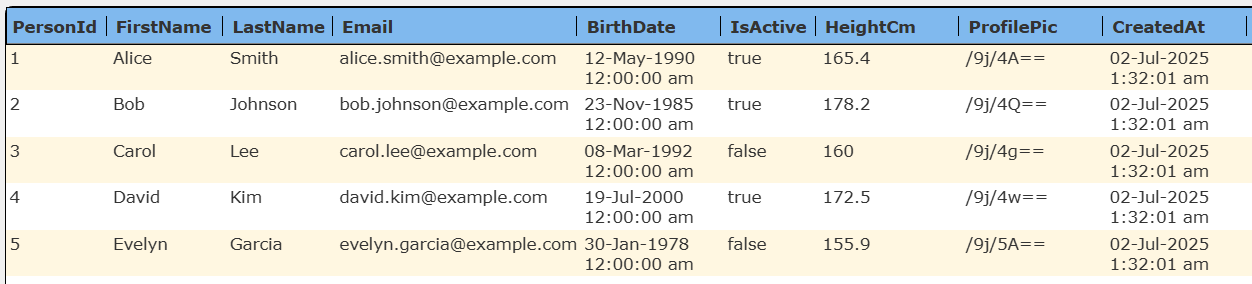
The details of the first row are shown below.
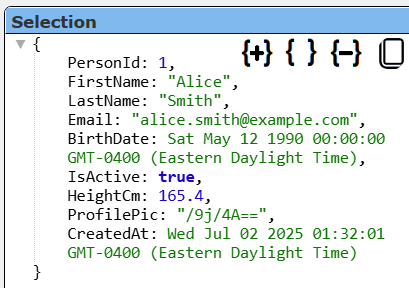
Notice that the booleans, dates, timestamps and other values are of the expected JavaScript type.
Below is the answer set when using Spanner Studio.

JSON Handling
Spanner supports a native JSON data type, enabling you to query semi-structured data alongside relational data. Use SQL functions like JSON_VALUE, JSON_QUERY, and JSON_CONTAINS to extract and filter data from JSON columns. You can create secondary and search Indexes directly on JSON columns for flexible, schema-less querying across diverse JSON documents.
Here is an example
SELECT VenueId, VenueDetails
FROM Venues
WHERE JSON_VALUE(VenueDetails, '$.rating') = '9'
For more details see https://cloud.google.com/spanner/docs/working-with-json.
JSON oriented functions are described at https://cloud.google.com/spanner/docs/reference/standard-sql/json_functions
Consider this table
CREATE TABLE Customer (
  CustomerId   INT64 NOT NULL,
  Name         STRING(100),
  Profile      JSON)
  PRIMARY KEY (CustomerId)
populated using
INSERT INTO Customer (CustomerId, Name, Profile)
VALUES
(1, 'Alice', JSON '{"tier": "gold", "preferences": {"newsletter": true, "sms": false}, "age": 30}'),
(2, 'Bob',   JSON '{"tier": "silver", "preferences": {"newsletter": false, "sms": true}, "age": 25}');
Running the query
select * from Customer
results in the following answer set.

The details of the first row are shown below.

Notice that the profile is a genuine JSON object and not a simple string value. Qarbine is fine with arbitrary JSON objects- even varied ones in the same answer set.
The query when run in Spanner Studio returns the following answer set.

Notice the Profile values are just strings and not genuine JSON objects.
Array Handling
The ARRAY column data type in Google Spanner allows you to store an ordered list all of the same data type, within a single column. This enables flexible data modeling for scenarios where a field may naturally contain multiple values, such as tags, lists of numbers, or sets of related items. The supported element types are:
- Simple types: INT64, FLOAT64, STRING, BOOL, DATE, etc.
- Complex types: STRUCT, JSON (e.g., ARRAY<STRUCT>, ARRAY<JSON>).
Consider this table
CREATE TABLE Contact (
  ContactId     INT64 NOT NULL,
  FirstName     STRING(100),
  LastName      STRING(100),
  PhoneNumbers  ARRAY<STRING(20)>)
  PRIMARY KEY (ContactId);
populated using
INSERT INTO Contact (ContactId, FirstName, LastName, PhoneNumbers)
VALUES
  (1, 'Alice', 'Smith', ['+1234567890', '+1987654321']),
  (2, 'Bob', 'Johnson', ['+1555123456']),
  (3, 'Carol', 'Lee', []);
Running the query
select * from Contact
results in the following answer set.

The details of the first row are shown below.

Notice that the PhoneNumbers is a list of strings.
Vector Querying
Spanner supports scalable vector search, enabling similarity search over high-dimensional data (such as embeddings from machine learning models). Spanner supports both exact K-nearest neighbor (KNN) and approximate nearest neighbor (ANN) search. ANN leverages Google's ScaNN algorithm for efficient vector search at scale. It can be used for general semantic search, recommendation systems, generative AI applications.
The embeddings used for searching can come from Google Vertex AI or other embedding service. Remember that whatever model is used to obtain the embedding for the search must match that used in the stored data. Queries return items whose embeddings are most similar (nearest neighbors) to a given query embedding, supporting use cases like semantic search and recommendations.
Below is a sample vector search query which references a Qarbine runtime variable containing the embedding value
SELECT ProductId, ProductName
FROM Products
ORDER BY
  APPROX_COSINE_DISTANCE(ProductDescriptionEmbedding, @query_embedding)
LIMIT 5;
Below is a sample vector search query which uses Qarbine AI Assistance to obtain the embedding for the query
SELECT ProductId, ProductName
FROM Products
ORDER BY
  APPROX_COSINE_DISTANCE(ProductDescriptionEmbedding,
  [! embedding(@query, "MyVertexAI") !}
LIMIT 5;
Full Text Search (FTS)
Spanner provides the SEARCH function to use for search index queries. An example use case would be an application where users enter text in a search box and the application sends the user input directly into the SEARCH function. The SEARCH function would then use a search index to find that text.
The SEARCH function requires two arguments:
- A search index name
- A search query
The SEARCH function only works when a search index is defined. It can be combined with any arbitrary SQL constructs, such as filters, aggregations, or joins. It can't be used with transaction queries.
The following query uses the SEARCH function to return all albums that have either friday or monday in the title:
SELECT AlbumId
FROM Albums
WHERE SEARCH(AlbumTitle_Tokens, 'friday OR monday')
The query can be modified to use a Qarbine runtime variable as shown below.
SELECT AlbumId
FROM Albums
WHERE SEARCH(AlbumTitle_Tokens, @userInputFilter)
For more information see https://cloud.google.com/spanner/docs/full-text-search/query-overview
and https://cloud.google.com/spanner/docs/reference/standard-sql/search_functions#search_fulltext
Qarbine Virtual Queries
There are a few convenience queries which are mainly DBA oriented. These queries are recognized by the Qarbine driver and provide common database information. Any catalog and schema set in the data service definition constrains what is returned. For example, if a catalog is given in the data service, then only schemas in that one catalog are returned.
These virtual query defaults are independent of whatever drop down option is chosen in the Data Source Designer tool. If a specific schema’s information is wanted for example, it must be explicitly given.
| Query | Description |
|---|---|
| list databases | Return a list of visible databases. |
| list tables [DATABASE] | Return a list of tables. The optional argument may be a database name. |
| describe tables [DATABASE] | Provide details on all of the tables. This may take a while depending on your database structure. |
| describe table TABLE | Provide details on the given table. |
Troubleshooting
If queries are not operating in a manner expected then verify them with the Google Spanner tools or third party query tools. Below is the sidebar option to access Spanner Studio.

There you can review the database structure, table schema, interactively run queries and perform other Spanner tasks.
For a discussion on query performance see https://cloud.google.com/spanner/docs/using-query-insights